
Export Vulnerabilities to BIG-IP Advanced WAF
Objective
Export scan findings to BIG-IP Advanced WAF to apply virtual patches to vulnerable endpoints.
Background
F5 Distributed Cloud Web App Scanning scans web applications and APIs for security vulnerabilities. Use BIG-IP Advanced WAF to protect applications from attacks that exploit these vulnerabilities. Export findings from completed scans to BIG-IP Advanced WAF. Then apply virtual patches to affected endpoints.
Use the BIG-IP Advanced WAF vulnerability assessment policy template to create a baseline security policy. Integrate the policy with F5 Distributed Cloud Web App Scanning. The integration suggests policy updates for vulnerabilities found in scan results. Select the vulnerabilities that you want the policy to address. Retest the application to confirm that the policy protects against them. Enforce the policy when you are ready.
For more information about BIG-IP Advanced WAF and its features, refer to the BIG-IP Advanced WAF documentation.
Prerequisites
Before you begin, verify that you have:
- An active F5 Distributed Cloud Services tenant with F5 Distributed Cloud Web App Scanning.
- A complete penetration test report from F5 Distributed Cloud Web App Scanning containing identified vulnerabilities.
- An active BIG-IP instance (version 14.1.0 or later) with a valid Advanced WAF license.
Export vulnerabilities from the Web App Scanning console
To export vulnerabilities, complete an automated penetration test for your application. After the scan completes:
- Go to the report page.
- Select Generate XML Export.
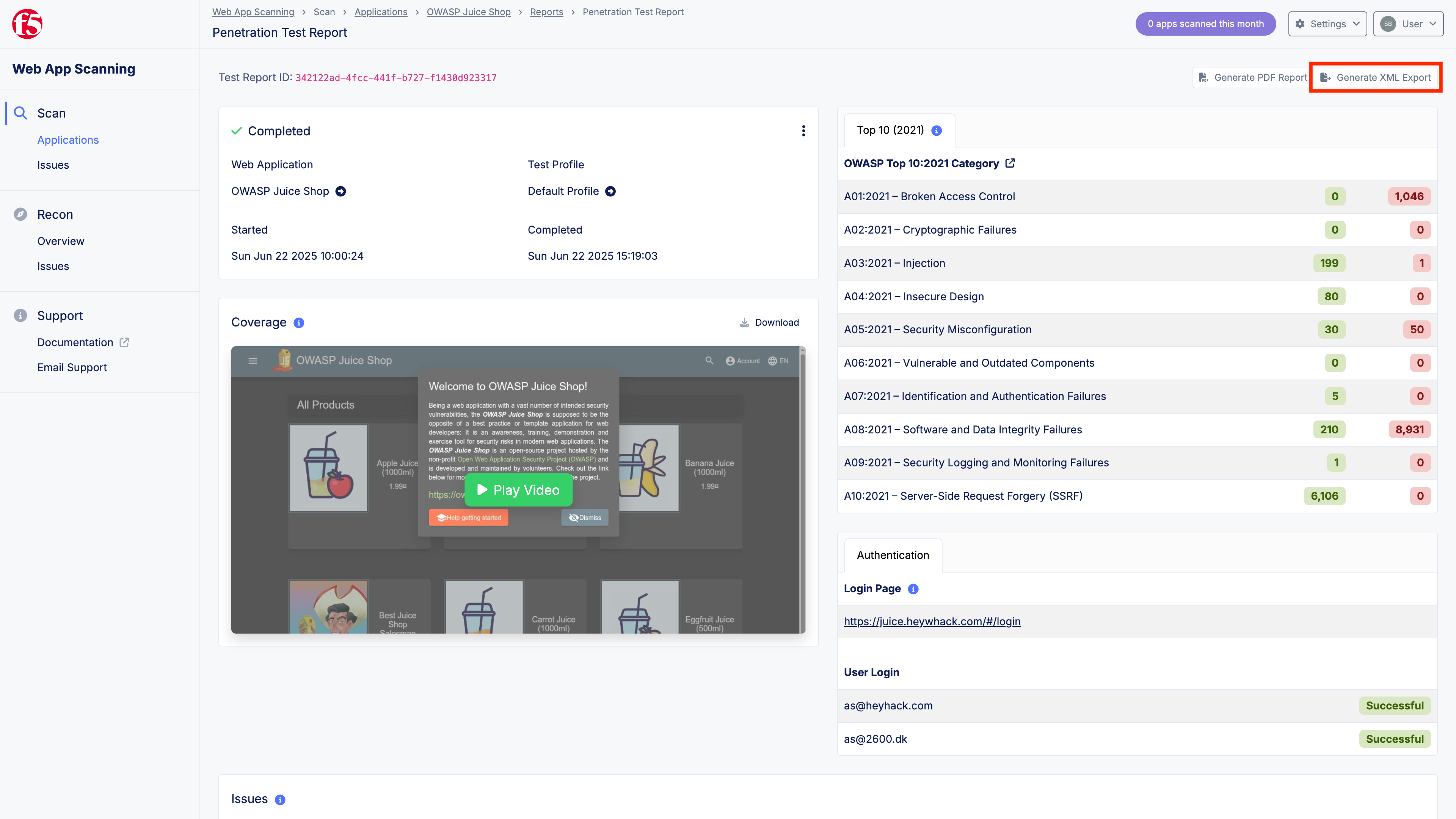
Generate an XML export from the scan report
The Web App Scanning console generates an XML file that lists identified vulnerabilities. Import the file into BIG-IP Advanced WAF. To apply virtual patches, see the BIG-IP Advanced WAF documentation.
Export vulnerabilities through the API
Use the Web App Scanning API to export vulnerabilities in the XML format that BIG-IP Advanced WAF accepts.
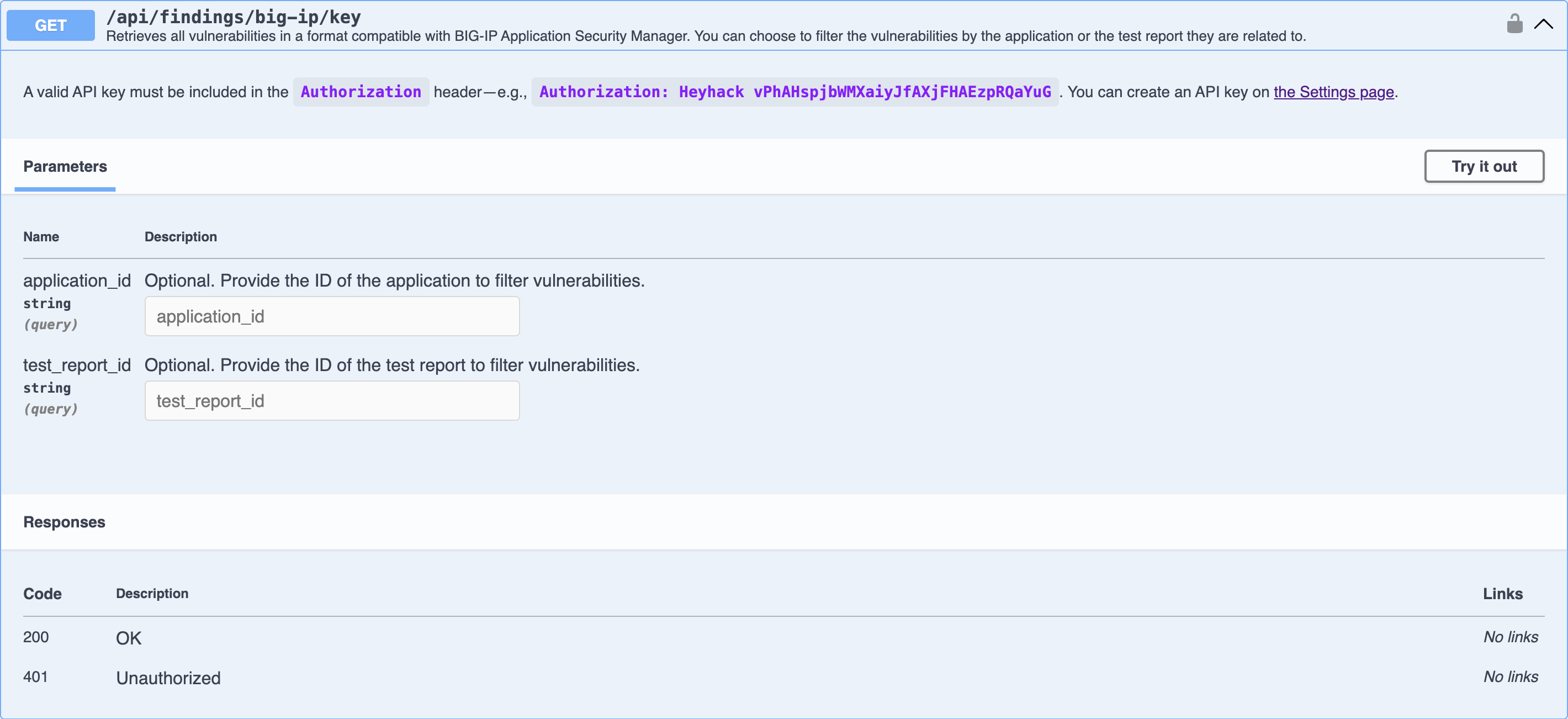
Export vulnerabilities through the API
Run the following curl command to export vulnerabilities for a test report. Replace <TEST_REPORT_ID> with the test report ID. Replace <API_KEY> with your API key.
curl --location 'https://app.heyhack.com/api/findings/big-ip/key?test_report_id=<TEST_REPORT_ID>' \ --header 'Authorization: Heyhack <API_KEY>'The API returns XML in this format:
<?xml version="1.0" encoding="utf-8"?><scanner_vulnerabilities xmlns:xsi="http://www.w3.org/2001/XMLSchema-instance" xmlns:xsd="http://www.w3.org/2001/XMLSchema" version="1.0"> <vulnerability> <attack_type>SQL-Injection</attack_type> <name>SQL Injection</name> <url>https://juice.heywhack.com/rest/products/search?q=1%27</url> <parameter>q</parameter> <threat>critical</threat> <score>10</score> <status>open</status> <opened xsi:nil="true" /> </vulnerability> <vulnerability> <attack_type>Cross Site Scripting (XSS)</attack_type> <name>Cross-site Scripting (Reflected)</name> <url>https://juice.heywhack.com/#/search?q='%3E%22%3Ehh%3Cimg%20src%3Da%20onerror%3Dalert(962366646)%3E962366646</url> <parameter>q</parameter> <threat>critical</threat> <score>9</score> <status>open</status> <opened xsi:nil="true" /> </vulnerability> <vulnerability> <attack_type>Cross-site Request Forgery</attack_type> <name>Cross-site Request Forgery (CSRF)</name> <url>https://juice.heywhack.com/profile/image/file</url> <threat>medium</threat> <score>5</score> <status>open</status> <opened xsi:nil="true" /> </vulnerability> <vulnerability> <attack_type>Cross-site Request Forgery</attack_type> <name>Cross-site Request Forgery (CSRF)</name> <url>https://juice.heywhack.com/socket.io/?EIO=4&transport=polling&t=PUMhW8Q&sid=TKwNRkKtaXyCsq8sBngq</url> <threat>medium</threat> <score>5</score> <status>open</status> <opened xsi:nil="true" /> </vulnerability> <vulnerability> <attack_type>Cross-site Request Forgery</attack_type> <name>Cross-site Request Forgery (CSRF)</name> <url>https://juice.heywhack.com/rest/user/login</url> <threat>medium</threat> <score>5</score> <status>open</status> <opened xsi:nil="true" /> </vulnerability> <vulnerability> <name>Insecure Transport Layer</name> <url>https://juice.heywhack.com/</url> <threat>medium</threat> <score>5</score> <status>open</status> <opened xsi:nil="true" /> </vulnerability> <vulnerability> <name>Insecure Transport Layer</name> <url>https://juice.heywhack.com/</url> <threat>medium</threat> <score>4</score> <status>open</status> <opened xsi:nil="true" /> </vulnerability> <vulnerability> <attack_type>Set-Cookie does not use Secure keyword</attack_type> <name>Cookie without Secure Flag</name> <url>https://juice.heywhack.com/#/score-board</url> <cookie>code-fixes-component-format</cookie> <threat>low</threat> <score>4</score> <status>open</status> <opened xsi:nil="true" /> </vulnerability> <vulnerability> <attack_type>Set-Cookie does not use Secure keyword</attack_type> <name>Cookie without Secure Flag</name> <url>https://juice.heywhack.com/#/login</url> <cookie>token</cookie> <threat>low</threat> <score>4</score> <status>open</status> <opened xsi:nil="true" /> </vulnerability> <vulnerability> <attack_type>Set-Cookie does not use Secure keyword</attack_type> <name>Cookie without Secure Flag</name> <url>https://juice.heywhack.com/#/</url> <cookie>welcomebanner_status</cookie> <threat>low</threat> <score>4</score> <status>open</status> <opened xsi:nil="true" /> </vulnerability> <vulnerability> <attack_type>Set-Cookie does not use Secure keyword</attack_type> <name>Cookie without Secure Flag</name> <url>https://juice.heywhack.com/#/</url> <cookie>cookieconsent_status</cookie> <threat>low</threat> <score>4</score> <status>open</status> <opened xsi:nil="true" /> </vulnerability> <vulnerability> <attack_type>Set-Cookie does not use Secure keyword</attack_type> <name>Cookie without Secure Flag</name> <url>https://juice.heywhack.com/#/</url> <cookie>language</cookie> <threat>low</threat> <score>4</score> <status>open</status> <opened xsi:nil="true" /> </vulnerability></scanner_vulnerabilities>For API details, refer to the API documentation.
Support
Contact Web App Scanning support for help.