
OWASP API Security Detection
Objective
F5® Distributed Cloud Web App & API Protection (F5XC WAAP) is purpose-built to help you monitor and secure your APIs by detecting potential vulnerabilities and suspicious activity, as outlined in the OWASP API Security Top 10. By continuously analyzing your API traffic, our solution provides deep visibility into how your APIs are being used—and potentially abused. We specialize in identifying security risks such as broken object-level authorization (BOLA), broken user authentication, broken object property level authorization (BOPLA), broken function-level authorization (BFLA), and other common vulnerabilities. The platform flags actions like unauthorized data access, anomalous behaviors, or malicious API usage, giving you timely and actionable alerts to help you quickly address and remediate security incidents before they escalate.
With advanced traffic monitoring and logging, our platform enables you to detect issues such as unauthorized function access, resource consumption anomalies, or attempts to exploit API misconfigurations. It also helps you better manage your API exposure by identifying insecure endpoints, tracking API usage patterns, and monitoring compliance with your security policies. Through real-time insights and dynamic incident reporting, we serve as your early warning system, so you can strengthen your API security posture and respond effectively to emerging threats.
Broken Object Level Authorization
Broken Object Level Authorization (BOLA) is an API vulnerability that occurs when there is a failure in validation of a user's permissions to perform a specific task over an object, allowing attackers to manipulate object identifiers and gain unauthorized access.
How is BOLA different from BOPLA?
-
Broken Object Level Authorization (BOLA): This vulnerability occurs when an attacker gains unauthorized access to an object, such as UserA accessing UserB's information, the attacker has exploited a lack of authorization at the object level.
-
Broken Object Property Level Authorization (BOPLA): This vulnerability occurs when a user is allowed to access or modify specific properties of an object that should not be allowed with their access permissions. For example, UserA might be able to see UserA's profile, but if he can change one of the properties in his profile from guest to super-user, he has just exploited a lack of authorization at the property level.
In summary, BOLA is about unauthorized access to entire objects, whereas BOPLA is about unauthorized access to specific properties within an object.
How do bad actors exploit BOLA vulnerabilities in an API?
Broken Object Level Authorization (BOLA) occurs when access controls are not properly enforced, allowing unauthorized users to access or manipulate data they shouldn't have access to. Consider the scenario below:
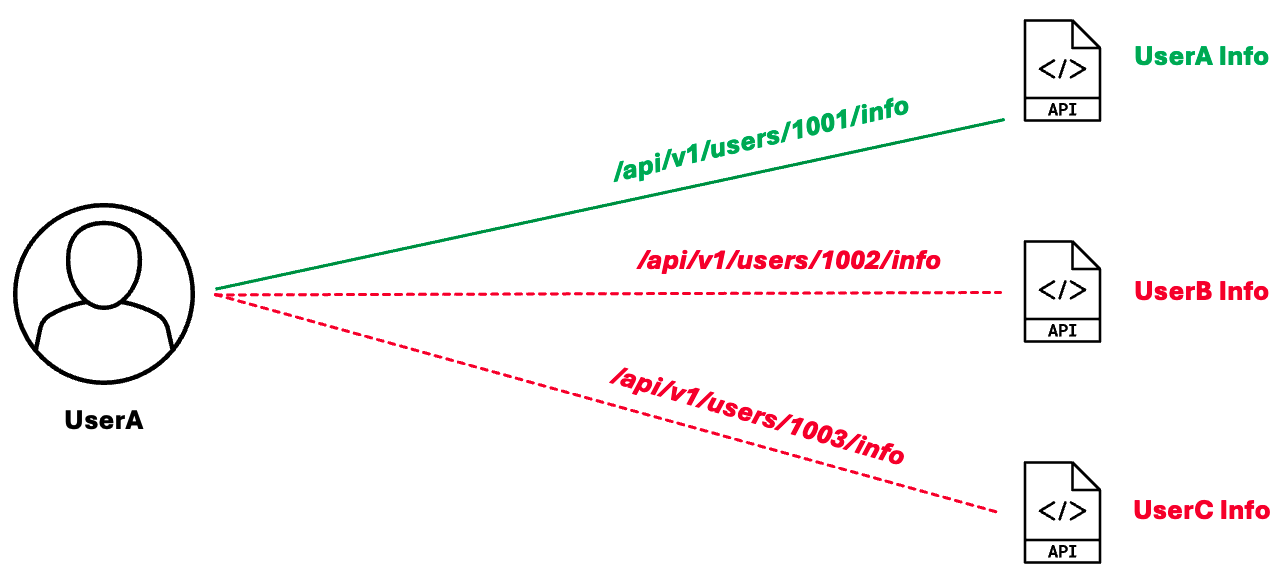
Figure: BOLA Exploit
UserA has legitimate access to UserA information through the API endpoint, /api/v1/users/1001/info. UserA might try to change the ID to a different ID, for instance, change 1001 to 1002 or other numbers, in an attempt to access another user's data. If the API lacks proper authorization checks, it returns another user's information, exposing sensitive information. In this way, an attacker can iterate through user IDs to access many other users' data.
How does Web App & API Protection detect BOLA attacks?
F5 Distributed Cloud's API Security detects BOLA attacks through its API Discovery and security features. These features analyze interactions between services and user requests to identify potential security threats, including unauthorized access to object properties.
BOLA detection maps all API Private Resources, and looks for events where an actor is accessing a Private Resource they should not have access to. A Private Resource is a specific data object or resource (dynamic objects) that is associated with, and accessible only by, an authorized individual user. API Security monitors access to private objects at an individual user level, helping to prevent BOLA attacks. F5XC will automatically extract the user information from the JSON Web Tokens (JWT) used for authorization, and it will be used as the unique identifier for that user. If a BOLA exploit is detected, it will be reported as a security incident. This could result in one of the following incidents:
- BOLA incident: Detects unauthorized access to data belonging to other users.
- Path Enumeration incident: Identifies enumeration attacks.
After a BOLA attack has been detected, you can implement mitigations in the Console by creating API Rules, restricting access to malicious IPs, blocking a specific API user, etc.
BOLA detection is reported on the security page of the load balancer handling the request(s). To see these detection,
Navigate to the Security Analytics/Incidents tab on the Load Balancer Security Monitoring page .
-
In your F5XC tenant, select the Web App & API Protection workspace.
-
Select your namespace from the Namespace drop-down menu.
-
Navigate to Overview > Security. This will show the tenant security dashboard.
-
Scroll to the Delivery Resources section at the bottom of the page and make sure HTTP LB is selected at the top of the section.
-
Select your load balancer in the Name column. This will bring up the Security Monitoring page for that load balancer.
-
Select the Security Analytics tab.
-
Select the Incidents option at the top.
Note: If you are looking for past incidents, you can adjust the time period shown in the table. Use the 🕒 Last... drop-down menu above the table to choose a longer time period.
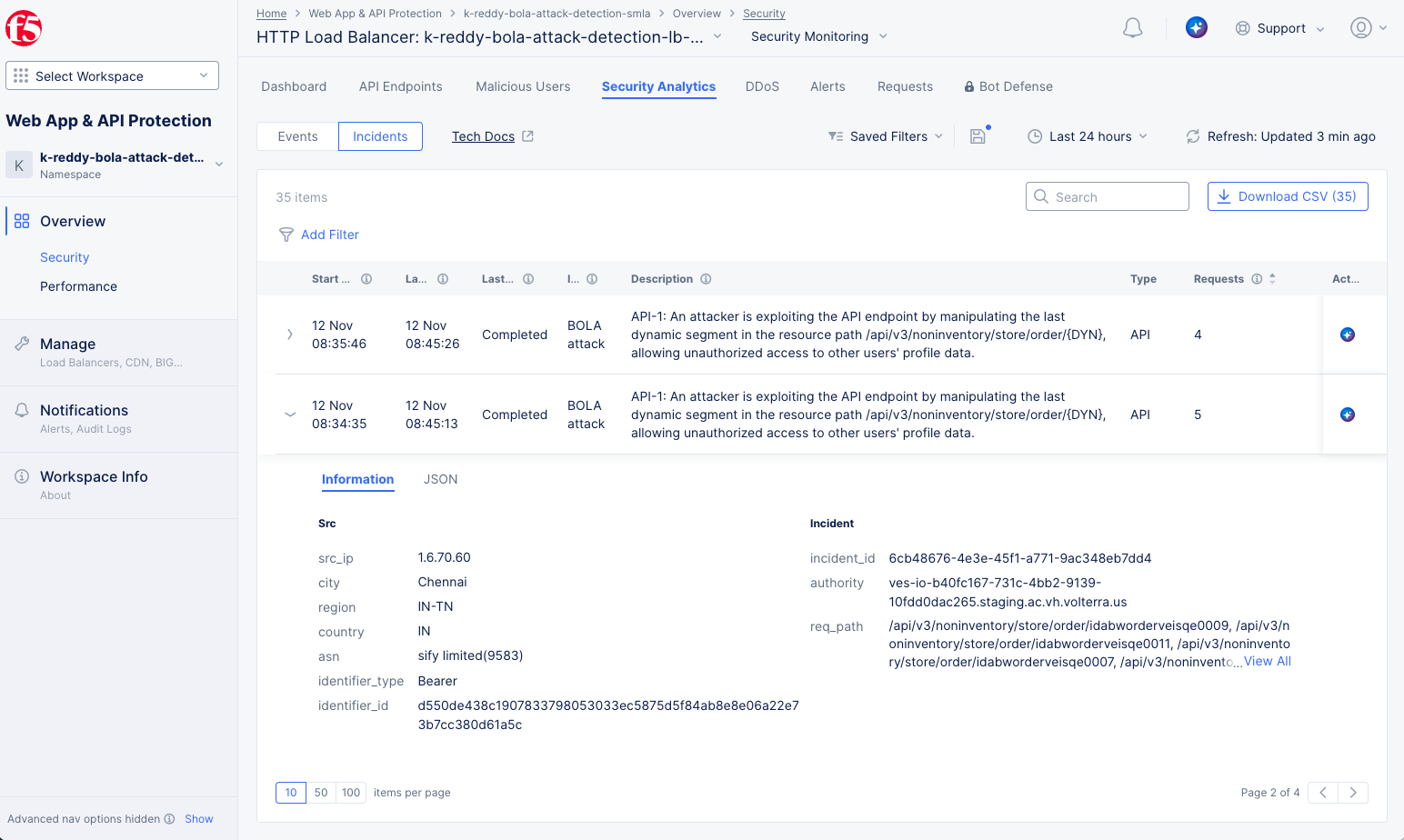
Figure: BOLA Detection
The example above shows a BOLA incident. The table entry provides an overview, including the date(s) of the incident, a description of the incident, and the number of requests involved. For more details, select the arrow in the leftmost column to expand the incident entry.
Broken Object Property Level Authorization
Broken Object Property Level Authorization (BOPLA) is an API vulnerability that occurs when an application fails to properly enforce authorization at the property level of an object, allowing authorized users of an object to modify or access specific properties of that object that they should not have access to.
How is BOPLA different from BOLA?
• Broken Object Level Authorization (BOLA): This vulnerability occurs when an attacker gains unauthorized access to an object, such as UserA accessing UserB's information. In this case, the attacker has exploited a lack of authorization at the object level. • Broken Object Property Level Authorization (BOPLA): This vulnerability occurs when a user is allowed to access or modify specific properties of an object that should not be allowed with their access permissions. For example, UserA might be able to see UserA's profile, but if he can change one of the properties in his profile from guest to super-user, he has just exploited a lack of authorization at the property level.
In summary, BOLA is about unauthorized access to entire objects, whereas BOPLA is about unauthorized access to specific properties within an object.
How do bad actors exploit BOPLA vulnerabilities in an API?
Broken Object Property Level Authorization (BOPLA) occurs when an application fails to properly enforce authorization at the property level of an object, allowing authorized users of an object to modify or access specific properties of the object that they should not have access to. For example:
-
Situation: An app hosts an API endpoint,
/api/user/profile, that allows users to see or update their profile details, such as{"username": "john_doe", "email": "john_newemail@example.com", "role": "user"}. The object contains a sensitive property,role, which should only be editable by administrators. -
Exploit: An attacker modifies the role property to a higher level,
{"username": "john_doe", "email": "john_newemail@example.com", "role": "admin"}, and then send it as an update request. If there are no property-level authorization checks, the attacker now has unauthorized access.
How does Web App & API Protection detect BOPLA?
Distributed Cloud's API Security detects BOPLA attacks by leveraging its advanced security features to meticulously examine requests. It identifies unexpected sensitive parameters in API requests and prevents mass assignment of parameters to API objects. This ensures that sensitive datasets are protected before they reach the inferencing service.
BOPLA detection is reported on the security page of the load balancer handling the request(s). To see these detection,
Navigate to the Security Analytics/Incidents tab on the Load Balancer Security Monitoring page .
-
In your F5XC tenant, select the Web App & API Protection workspace.
-
Select your namespace from the Namespace drop-down menu.
-
Navigate to Overview > Security. This will show the tenant security dashboard.
-
Scroll to the Delivery Resources section at the bottom of the page and make sure HTTP LB is selected at the top of the section.
-
Select your load balancer in the Name column. This will bring up the Security Monitoring page for that load balancer.
-
Select the Security Analytics tab.
-
Select the Incidents option at the top.
Note: If you are looking for past incidents, you can adjust the time period shown in the table. Use the 🕒 Last... drop-down menu above the table to choose a longer time period.
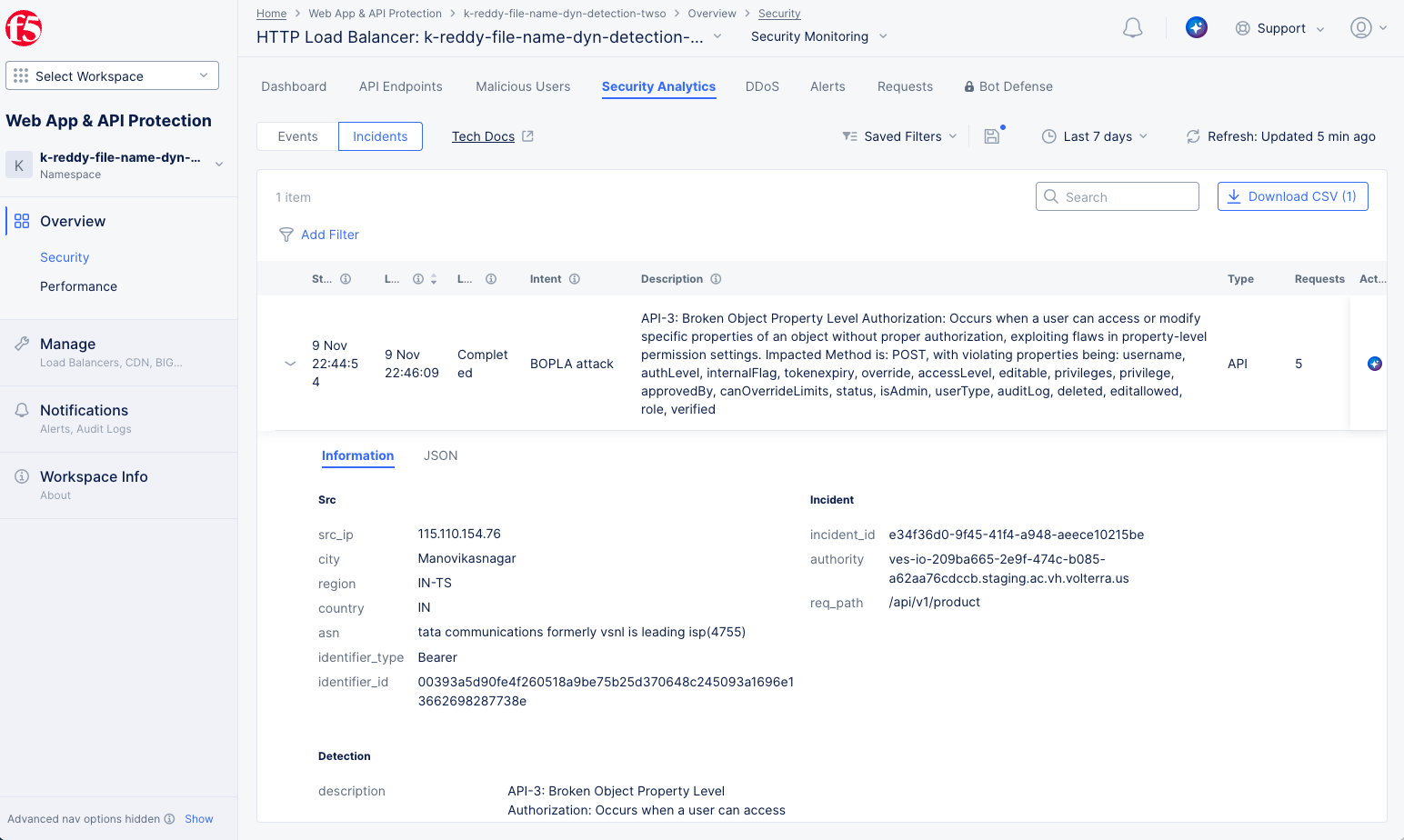
Figure: BOPLA Detection
The example above shows a BOPLA incident. The table entry provides an overview, including the date(s) of the incident, a description of the incident, and the number of requests involved. For more details, select the arrow in the leftmost column to expand the incident entry.
Broken Function Level Authorization
Broken Function Level Authorization (BFLA) occurs in APIs when authorization mechanisms fail to properly enforce user permissions for certain actions or functions, allowing attackers to perform unauthorized operations. This vulnerability often arises from inadequate access control checks, overly permissive roles, or inconsistent enforcement of privilege levels across different API endpoints. Exploiting these weaknesses, attackers can execute administrative or sensitive functions they are not authorized to perform, potentially compromising the integrity or security of the application.
How is BFLA different from BOLA?
• Broken Object Level Authorization (BOLA): This vulnerability occurs when an attacker gains unauthorized access to an object, such as UserA accessing UserB's information. In this case, the attacker has exploited a lack of authorization at the object level, allowing access to an object they should not have permission to interact with.
• Broken Function Level Authorization (BFLA): This vulnerability occurs when an attacker is able to perform unauthorized actions on or with an object due to insufficient authorization checks at the function or action level. For example, UserA might have access to view certain information, but if UserA can modify sensitive functions, such as changing a GET request to a DELETE request, then UserA could be attempting to delete that information without authorization.
BOLA focuses on unauthorized access to entire objects. It occurs when an API endpoint allows access to an object without verifying if the user is authorized to access that specific object.
BFLA focuses on unauthorized access to specific functions or actions. It occurs when an API endpoint allows a user to perform actions they are not authorized to execute.
How do bad actors exploit BFLA vulnerabilities in an API?
BFLA (Broken Function Level Authorization) attacks exploit weaknesses in how APIs handle access control for their exposed functions. In essence, BFLA occurs when a legitimate request is manipulated to invoke an unauthorized function. For example, an attacker might modify a request intended to retrieve information (e.g., a GET request) into a request that performs a restricted action, such as deleting information (e.g., a DELETE request). Below are some examples of how this can happen:
Method-Based Functions: In this scenario, the HTTP method (e.g., GET, POST, PUT, or DELETE) represents the function, while the endpoint path specifies the resource being acted upon. The action is determined by the HTTP method used. A BFLA attack occurs when an attacker manipulates the HTTP request method to invoke unauthorized functions. For example, an attacker could change a GET request, which is meant to retrieve data, into a DELETE or PUT request to maliciously delete or modify information. This type of attack is made possible when the application fails to properly enforce access controls for each HTTP method, allowing attackers to perform operations they are not authorized to execute.
Legitimate example:
GET /products/{productID}: This endpoint retrieves information of a product in an e-commerce site.
BFLA Attack:
DELETE /products/{productID}: An attacker can attempt to delete a product without authorization.
Query Parameter-Based Functions: In some APIs, functions can be specified through query parameters within the endpoint. While this approach is less common, it is sometimes used for certain types of operations or to provide additional functionality for a request. A BFLA attack occurs when an attacker manipulates the query parameters in an HTTP request to invoke unauthorized functions. For example, an attacker might alter a query parameter to escalate privileges or trigger a restricted operation. This vulnerability usually arises because the application fails to implement proper authorization checks for actions defined by query parameters.
Legitimate example:
GET /account?action=view&acctID=1111: This endpoint retrieves information of an account.
BFLA Attack:
GET /account?action=delete&acctID=1111: An attacker can attempt to delete their account without authorization. Note this attack abuses the function action=delete in the query parameters, and it is not about accessing other account IDs (which would constitute a BOLA attack).
How Does Web App and API Protection detect BFLA?
BFLA detection involves mapping all API-accessible functions and actions while continuously learning the authorizations required by users for accessing each API endpoint. This learning process helps establish a baseline of expected behavior and privileges for various user roles and accounts. A function, in this context, refers to a specific operation or capability within the application (such as modifying data, initiating processes, or accessing administrative endpoints) that should only be accessible to users with the appropriate permissions. API Security proactively monitors the access and execution of these protected functions at a user privilege level, ensuring unauthorized access attempts are identified and mitigated to prevent BFLA attacks. F5XC further enhances this process by automatically extracting user information from JSON Web Tokens (JWT) used for authorization, designating this information as the unique identifier for each user. If a BFLA exploit attempt is detected, it will be flagged and reported as a security incident.
Broken Authentication Detection
Broken Authentication occurs in APIs when authentication mechanisms are improperly implemented or insufficiently secured, allowing attackers to compromise user accounts or the system. This vulnerability may arise from weak password policies, missing or improper token validation, credential stuffing, or the exposure of session IDs. By exploiting these weaknesses, attackers can impersonate legitimate users and gain unauthorized access to sensitive information or restricted functionalities.
How does Web App & API Protection detect Broken Authentication?
Distributed Cloud's API Security maps all endpoints to an authenticated state (authenticated/unauthenticated) using both API Discovery and uploaded OpenAPI Specs. This includes endpoints from the OpenAPI Specs you've provided, as well as Discovered endpoints that you have "moved to inventory," meaning they are approved. Once an endpoint is approved, it is locked to the authenticated state, and any subsequent traffic to that endpoint is assumed to require authentication.
Fundamentally, API Security identifies vulnerabilities in authentication (It’s worth noting that API Security also has the capability to detect vulnerabilities in many other areas beyond authentication). For example, a weak JWT configuration without an adequate expiration policy or the use of default credentials with basic authentication are both vulnerabilities that can be detected. These examples fall under the 'weak authentication' category of vulnerabilities.
How do bad actors exploit Weak Authentication in an API?
Attackers attempt to exploit vulnerabilities in authentication methods to bypass authentication mechanisms and gain unauthorized access to sensitive endpoints and data. These vulnerabilities may arise due to misconfigurations, the absence of robust authentication mechanisms, or weaknesses in authentication logic. Such attacks can result in data breaches, unauthorized actions, and the potential compromise of the entire system.
Prerequisites
The following prerequisites apply for all OWASP API Security Detection capabilities:
-
An F5 Distributed Cloud Account. If you do not have an account, see Getting Started with Console.
-
An HTTP load balancer. See HTTP Load Balancer and vK8s Deployment guides for more information.
Configuration
The OWASP API Security Detection capabilities described above are always active for API Security users with API Discovery enabled in a load balancer—no other configuration is required. See HTTP Load Balancer to learn how to enable API Discovery.
Concepts
On this page:
- Objective
- Broken Object Level Authorization
- How is BOLA different from BOPLA?
- How do bad actors exploit BOLA vulnerabilities in an API?
- How does Web App & API Protection detect BOLA attacks?
- Broken Object Property Level Authorization
- How is BOPLA different from BOLA?
- How do bad actors exploit BOPLA vulnerabilities in an API?
- How does Web App & API Protection detect BOPLA?
- Broken Function Level Authorization
- How is BFLA different from BOLA?
- How do bad actors exploit BFLA vulnerabilities in an API?
- How Does Web App and API Protection detect BFLA?
- Broken Authentication Detection
- How does Web App & API Protection detect Broken Authentication?
- How do bad actors exploit Weak Authentication in an API?
- Prerequisites
- Configuration
- Concepts